Block Contact Create, Write, and Delete - Record Rules
Occasionally in Odoo you need to prevent users from creating, updating, or deleting contacts. Odoo provides a per user setting which appears to do exactly that however it does not always achieve that goal depending of what other privileges the user has been granted. Record rule can help in this situation.
A record rule is an additional layer of security in Odoo that determines which records a user is allowed to access. While access rights (ACLs) define what actions a user can perform such as create, read, update, or delete a record rule determines which specific records those actions apply to.
For example, a user may have permission to edit contacts, but a record rule can restrict them so they can only edit contacts belonging to their own company, their assigned customers, or contacts that meet specific criteria. Any records that do not satisfy the rule are effectively invisible or inaccessible for the restricted operations.
Record rules are evaluated whenever a user attempts to access a record. They work by applying a filter (known as a domain) to determine whether the record should be available to that user.
In situations where the standard per-user permissions are insufficient, record rules provide a more precise and reliable way to control access. For example, if you need to prevent users from modifying contacts while still allowing them to view them, a record rule can enforce that restriction regardless of other permissions the user may have inherited through their security groups.
Because record rules are cumulative, the final access a user receives depends on the combination of their access rights, security groups, and all applicable record rules. Care should therefore be taken when creating or modifying record rules, as an incorrectly configured rule can unintentionally grant or deny access to records.
How to prevent users creating, updating, or deleting contacts
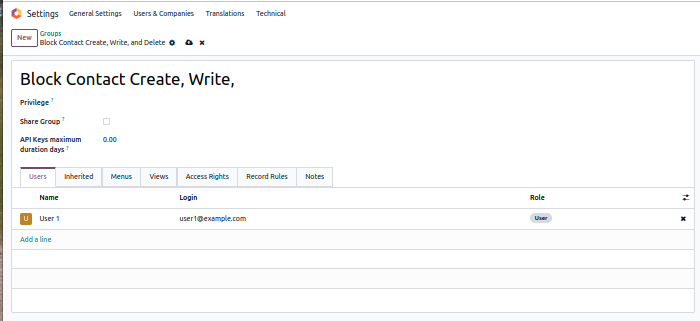
Step 1: Create a group
- As an administrator, enable debug/developer mode
- Go to Settings -> Users and Companies -> Groups
- Create a group Block Contact Create, Write, and Delete
- Add the users you want to block.
Step 2: Create the Record Rule
- As the administrator, enable debug/developer mode
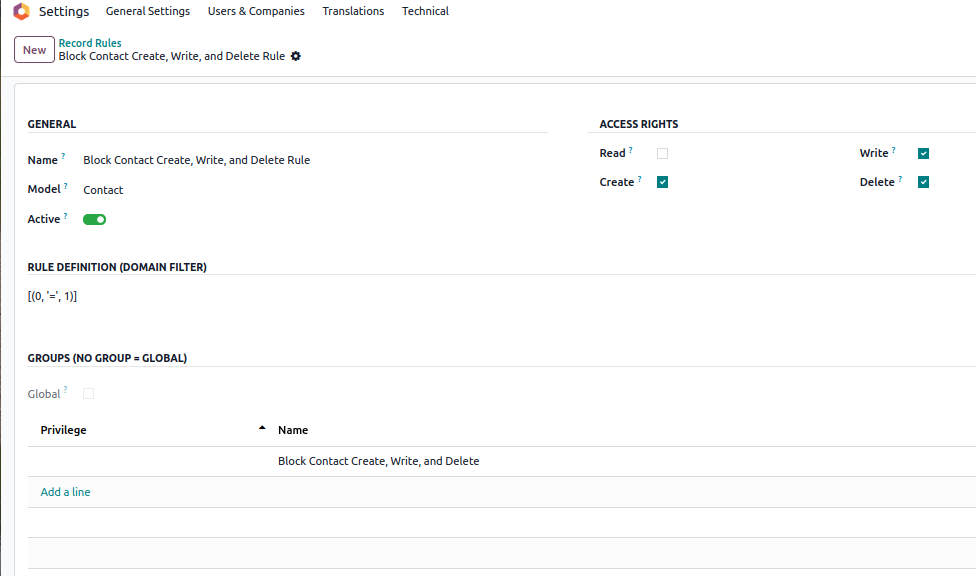
- Go to Settings -> Technical -> Record Rules
- Click New
- Add a name: Block Contact Create, Write, and Delete Rule
- In the model add Contact
Set the access rights
- Read: Untick
- Create: ✅
- Write: ✅
- Delete: ✅
- Domain: [(0, '=', 1)]
- In Privilege, Add a line
- Add the group you made in step 1: Block Contact Create, Write, and Delete
- Save
And you are done.
From now on, all you need to do is add or remove users from the group.
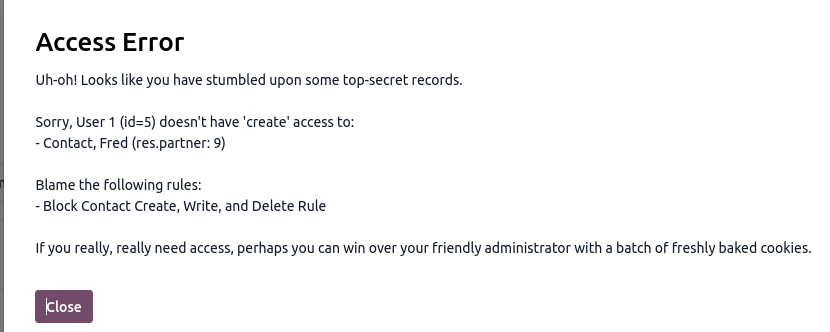
When a user in this group now tries to add, change, or delete a contact, they get this message: